Using Handoff / Orchestrator Pattern
Extended Claude Code sessions can lead to usage cap issues, reduced agent performance, and increased costs. To address this, a handoff script can be generated for another session to execute a specific task. Here's an example.
When working with Claude Code, I occasionally encounter challenges in hitting usage caps during extended sessions. Besides usage caps, long sessions also present other issues, such as a “dumber” agent, compressed conversations that hinder context comprehension, and escalating costs as you continuously send an increasingly lengthy chat thread to Anthropic with each new message.
Instead of utilizing the same chat session for a task, you can request that the session generate a handoff script (a specific task) that another session can execute for you. I’m going to use my metaharness application (sunny-bots) to show how this works.
Ask for a handoff task
My app has a few bugs, so I asked Claude to create a handoff script to fix them. Here’s what I would’ve told claude code if I still used it via the CLI:
Write a handoff script that I can copy and paste to give to another agent to complete the work. Your task is more exploratory, so you should gather enough context so that another agent can fully comprehend the task they need to perform. If you need to create separate handoff tasks, do so and provide them to me.
Then, it would generate some kind of output after conducting some research. Here’s an example of my meta-harness app requesting a handoff (note: I don’t need to explicitly inform it about a handoff script since that description is stored in its memory).
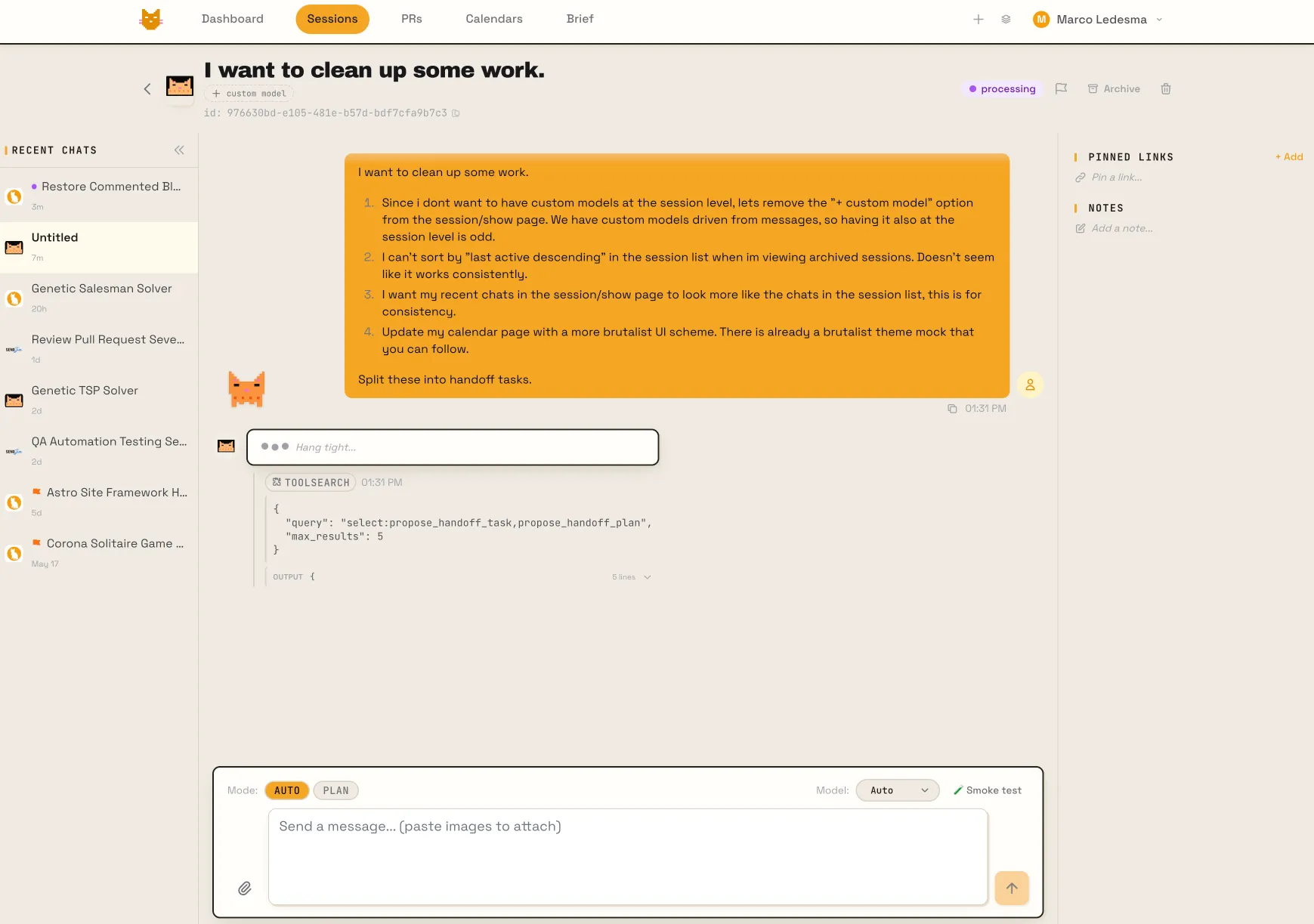
Based on its tool calling, I saw that claude send a subagent to do exploration into the codebase.
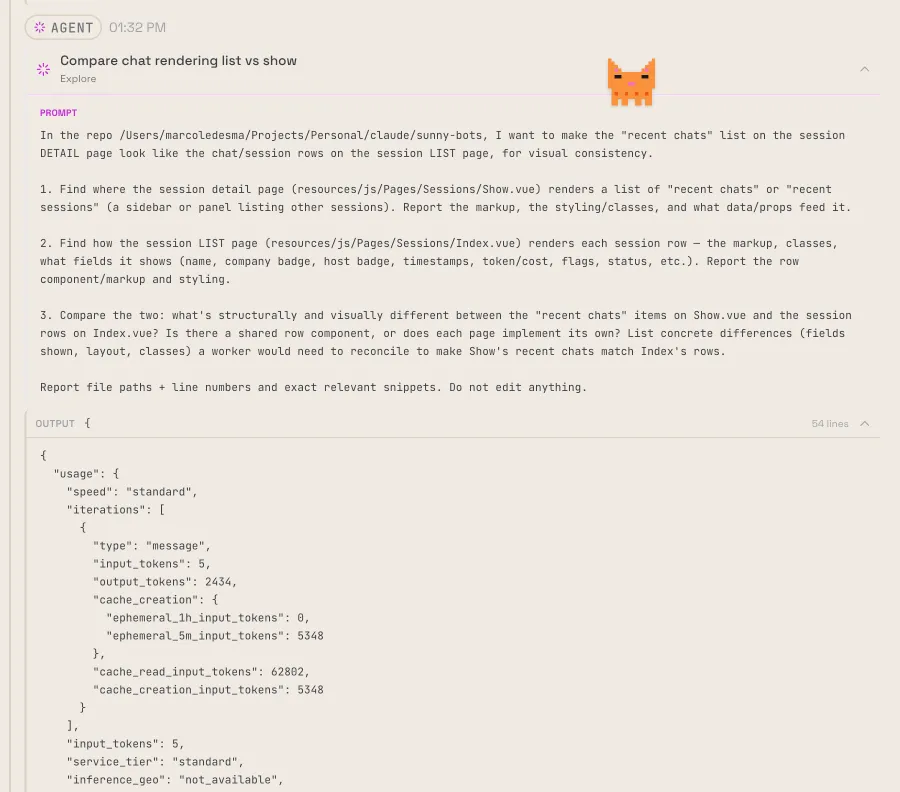
When it was done, it produced the following handoff task:
Goal: the “recent chats” list on the session detail page should look like the session rows on the session list page, for visual consistency. Right now they’re two separate hand-rolled markups that drifted apart.
NOTE: this task depends on the ‘Remove session-level custom model option’ task, which also edits Sessions/Show.vue. Start from the branch/state after that task so you’re not fighting stale line numbers — re-read the file before editing.
Files:
- Recent chats on resources/js/Pages/Sessions/Show.vue (explored ~lines 2505-2620): a
<Link v-for="chat in recentSessions">loop. Renders: company ClientIcon (size 6), a status ping dot, flag icon, session name (text-sm, normal weight), and relative time (text-[11px]).- Session rows on resources/js/Components/SessionSplitView.vue (explored ~lines 695-844): a
<button v-for="s in group.sessions">loop. Renders more: a left color stripe (selection indicator), ClientIcon, status ping, a Spec/Handoff badge, bold name (text-sm font-medium), a subtitle line (notes / summary / last-message preview), relative time (text-[10px]), a task-progress bar + count when present, similarity badge (search mode only), flag icon, archived dimming, and handoff-child indentation. There is currently NO shared row component.Approach (recommended): extract a shared session-row component (e.g. resources/js/Components/SessionRowItem.vue) that renders the list-row layout, with optional props to toggle the bits that only make sense in one place (similarity badge → list/search only; archived dim and handoff-child indent → list; selection stripe → optional). Use it in BOTH SessionSplitView.vue and the Show.vue recent-chats panel so they stay in sync. If a full extraction is too invasive, at minimum align the Show.vue recent-chats markup/classes to match the list row (bold name, subtitle line, matching relative-time size, status/flag/spec badges, company icon treatment) — but the shared component is the cleaner outcome and is preferred.
Watch the constraints: recent chats is a narrow fixed-width sidebar (w-60), so make sure the row degrades gracefully at that width (truncation already in place). The recent-chats item is a
<Link>navigation while the list uses a<button>withselectedIdselection — the shared component should support both (e.g. anas/hrefprop or a slot) without breaking either page’s navigation behavior.Acceptance criteria:
- Recent chats on the detail page visually match the session-list rows (same fields, weights, badges, spacing) within the narrower sidebar width.
- The session list page is unchanged in appearance/behavior (no regression).
- Navigation from a recent-chat item still works, and selection on the list page still works.
npm run lint(0 errors),npm run type-check, existing specs (Sessions/Show.spec.ts, Sessions/Index.spec.ts) pass; update them if the markup change requires it.APP_ENV=testing herd php artisan testpasses.- Run
npm run build.
Sending this to another agent
Now that you have the specific prompt, you can forward it to a new agent session. Another significant advantage of this is that you can utilize different models for various tasks. For instance, to implement the task mentioned above, you can rely on Sonnet or even the Haiku models. Additionally, you can use another harness that connects to OpenRouter, expanding your workflow to a vast array of other models.
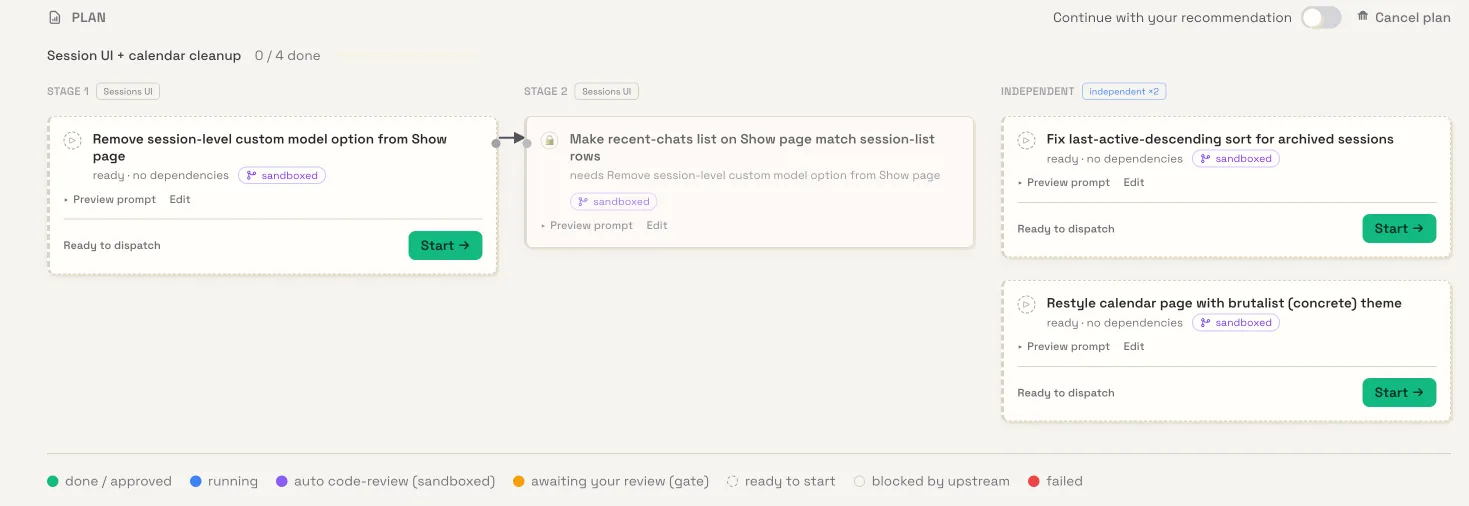
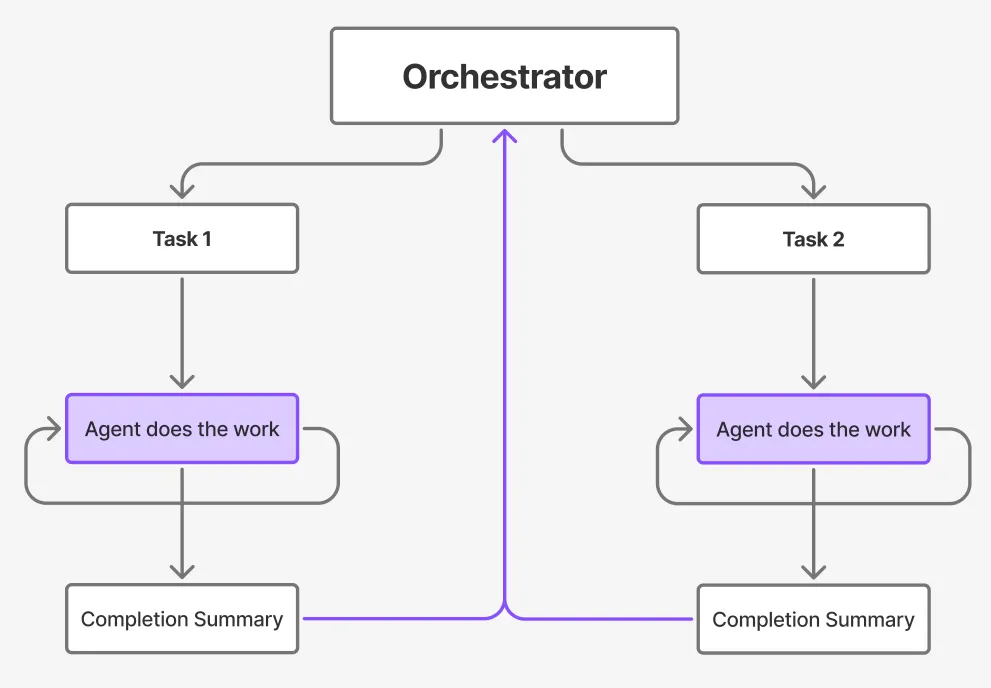
When I was still working within the claude code CLI, I would copy and paste the summaries from those other agents back into the orchestrator. However, since I built sunny-bots (my meta-harness), I decided to create a chain of jobs to handle this task for me. I also developed a visualizer that resembles the following:
Or more simply:
Watching it work
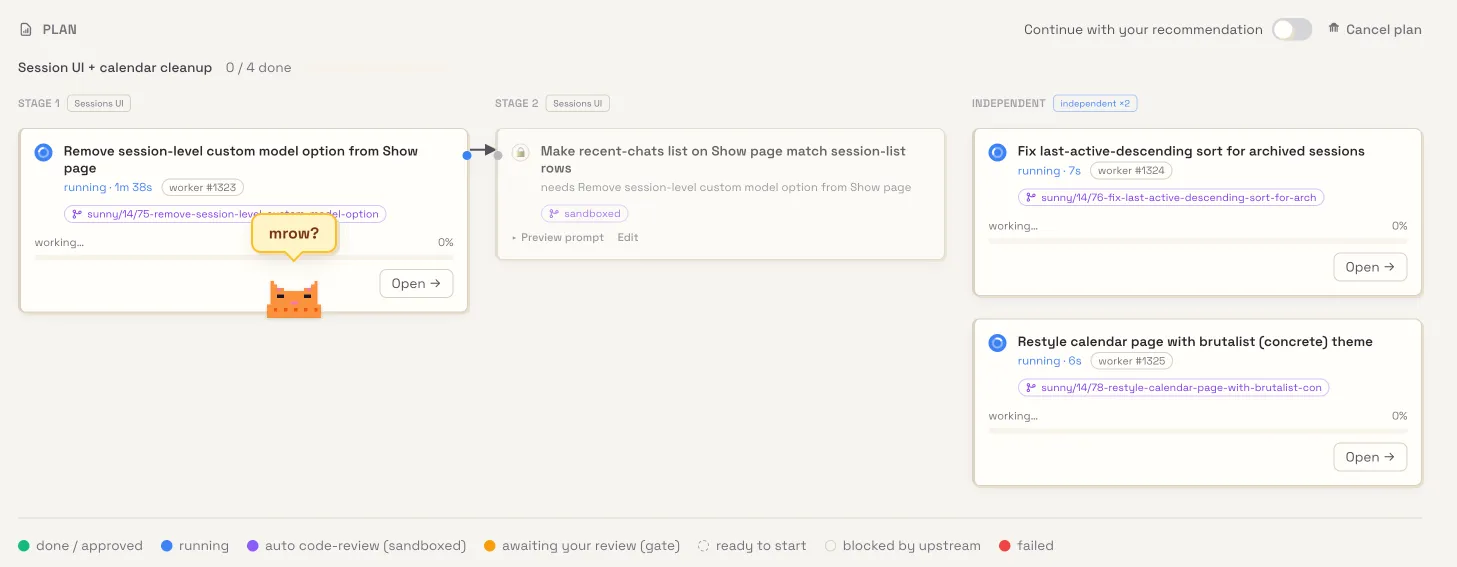
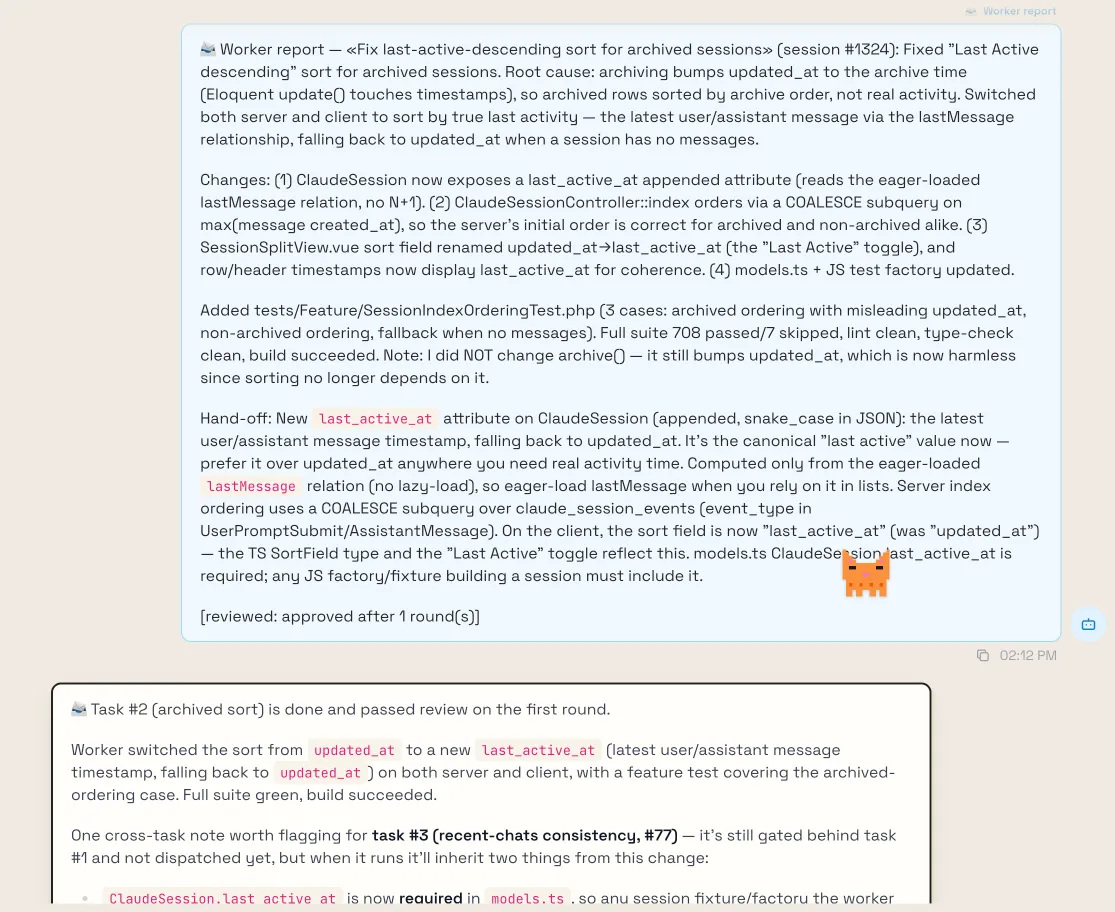
I’ve initiated three tasks to run concurrently, each utilizing its own branch (git worktree). These tasks are essentially fresh agent sessions executing the hand-off scripts generated by the orchestrator. Upon completion, the orchestrator’s chat session will be populated with a summary of each task’s execution.
AI Sources you may find helpful
It’s incredibly challenging to keep pace with the rapid evolution of AI. I usually rely on platforms like Reddit and YouTube series to stay informed, but even with these resources, I still feel like I’m lagging behind. In light of this, I thought I’d share my sources of information in case you find them helpful.
- https://www.reddit.com/r/AI_Agents/ - Good information on what other people are doing with agents. Though, beware, some posts are by bots. You can typically tell just by the writing style. Still, there’s some good nuggets of information there.
- https://www.youtube.com/@samwitteveenai - This guy is on edge of AI research. He also seems like a good honest person that just genuinely loves to learn. I don’t know him personally, but I love his content.
- ˇhttps://www.youtube.com/@ZeroToMVP - Another AI tinkerer. His videos seem more practical rather than research heavy. He shows how you can set up local models on your machine / tests them himself.
- https://huggingface.co/papers/date/2026-06-05 - Hugging face has a daily papers area where AI researchers share their published content. I remember reading once about Chain Of Thought reasoning back in the GPT 4 days and it was pretty thought provoking. I remember building a version of that using a ReAct pattern (not the JS framework)
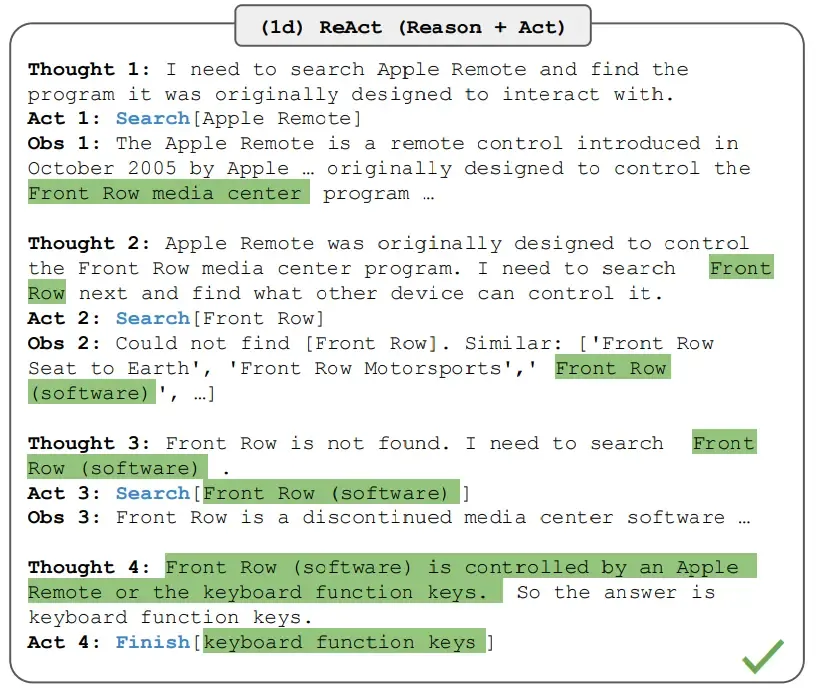
source: https://arxiv.org/abs/2210.03629
Other tips and tricks
Some things I’ve learned when I use AI agents:
- Stay curious on other AI agents out there. Right now, Claude appears to be the fan favorite, but OpenAI is winning people back with Codex.
- Try open source models using an open source agent harness, such as Hermes or Pi (which is becoming one of my favorites). Connect either of these to OpenRouter and try new models. One particularly strong and affordable option compared to Claude is https://openrouter.ai/xiaomi/mimo-v2.5-pro.
- Use git worktrees for parallel work. A worktree is just a clone of your main repository, allowing changes to be made outside of your main repo.
- Encourage your sessions to reflect on their work and identify key takeaways that they can retain for future reference. Token usage can be costly, so explore alternative methods to minimize its consumption.
- Ask claude to create scripts for deterministic work. For example, linting your work, running unit tests, and other post-commit processes can be put into a single python script that claude is asked to invoke. As much as possible, we should strive to only reach for the use of LLMs for work that requires judgement – that can’t be programmed into a step by step workflow. This will save you token usage while also providing more deterministic outputs compared to probabilistic ones.
- Reverse-engineering prompts. For example, ask a question like “I want to build a feature similar to competitor XYZ, this is what it looks like and what it does (image attached). What prompt could I give another agent to build something like this?”. You will then get a prompt that is highly detailed that you can iterate on, eventually handing it off to another agent.
- Maybe a hot take, but if you’re a developer, don’t use Open Claw or any other type of agentic system that’s prebuilt. Build it yourself instead. Most use cases for Open Claw revolve around workflow automations that you can instruct Claude or any other agent harness to design and build for you. Subsequently, you can rent a low-cost VPS and host the application. Personally, I find Laravel to be an excellent choice for such tasks. Laravel provides all the necessary tools and features to build a comprehensive agent.
- An AI SDK
- Scheduled Jobs
- Job Orchestration
- APIs
- Views
- Email support
- Vue/React/Svelte frameworks for SPAs
- And so much more.
- Build your own UI around your harness (metaharness). Having something that monitors your chat and extracts crucial information about your workflow is incredibly beneficial. You can then integrate it with your calendar, email, perhaps a design viewer, a diff viewer, and connections to your most frequently visited websites, among other things. It truly transforms into a fully controlled playground.
Summary
This all began with a single workflow feature that I now use frequently. I hope this is helpful in your daily workflow. It helps me save on tokens, produce better-quality output, and make it easier to comprehend large features when they’re broken down into manageable chunks. I also hope that there’s something in the tips and tricks section that you may find useful. If you do, please let me know via the platform where I decide to post this!
Thanks for reading.